

Upload and share health care directives using the web
Sign in to your MySaskHealthRecord and select the Health Care Directive tab.
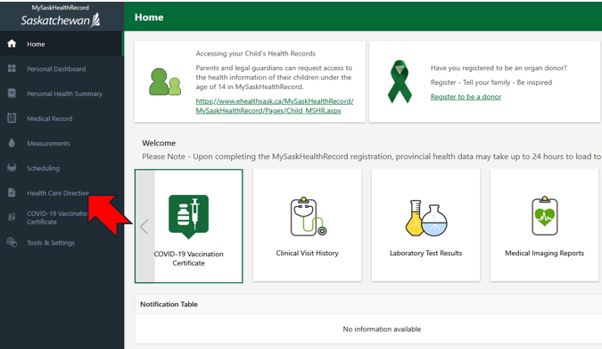
Select Add Health Care Directive and choose your health care directive from your files.
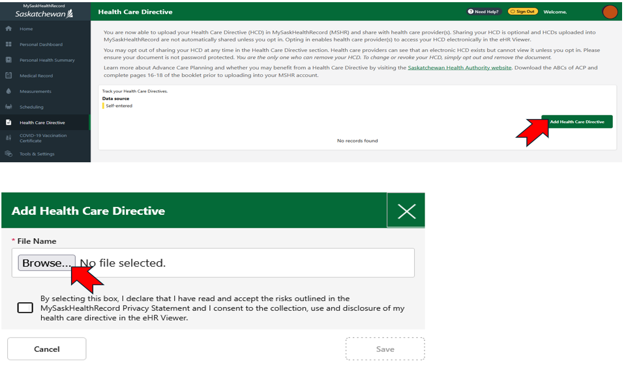
Tip: Learn about health care directives and decide if one is right for you.
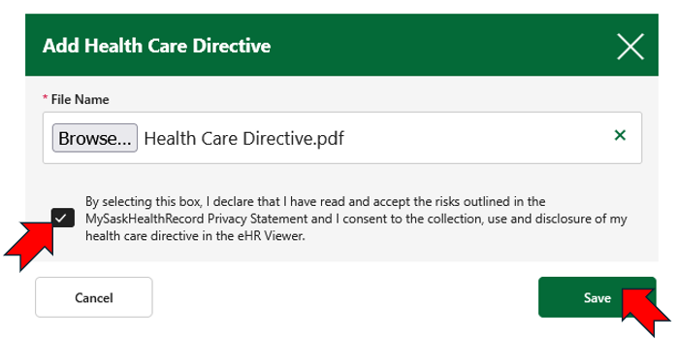
Review the privacy statement. Check the box to securely provide access to your health care directives. Then select Save.
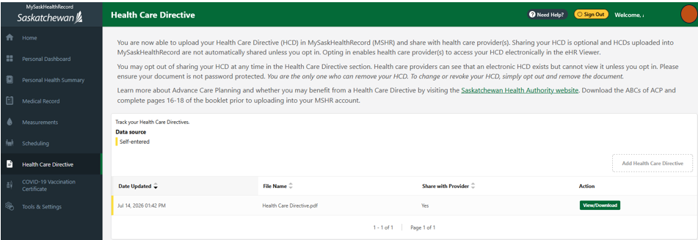
Tip: Keep your health care directives up to date. If you make changes, upload the new version and remove any outdated copies to ensure the correct document is accessible when needed.
Troubleshooting and support
If you experience issues uploading or sharing your document, please contact the MySaskHealthRecord Service Desk.
Contact MySaskHealthRecord
Phone
1-844-767-8259 (Toll-free Canada and U.S.)
mysaskhealthrecord@ehealthsask.ca
8 a.m. to 4:30 p.m., Monday to Friday, excluding holidays.